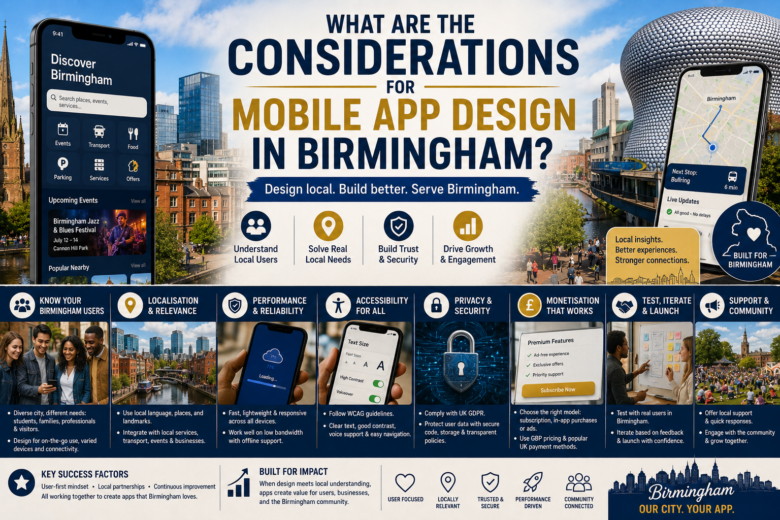
Designing a mobile app for users in Birmingham requires more than good visuals and smooth navigation. To succeed, you must understand local user behavior, technical constraints, market expectations, and legal requirements that shape how people discover, download, and use apps across the city and surrounding areas. This guide walks you through the practical considerations—user needs, performance, accessibility, localisation, monetisation, testing, and launch—so you can build an app that resonates with Birmingham audiences and performs well in UK app marketplaces.
Understand your Birmingham users
Know the local audience
- Demographics: Birmingham is a diverse city with students, professionals, families, and international communities. Design for broad age ranges and multicultural backgrounds.
- Use contexts: Commuting by bus, train, or car; walking in city centers; using apps in cafés, shops, and at home—each context influences session length and feature priority.
- Device mix: Expect a range of Android and iOS devices, including mid-range Android phones common among cost-conscious users. Optimize for varying screen sizes and performance levels.
- Connectivity: Urban centres have good mobile data coverage and Wi‑Fi, but suburban and some inner-city pockets can have intermittent speeds. Design for graceful network degradation.
Map user intent and local needs
- What are they trying to achieve? Quick answers: local services, transit info, event listings, shopping, restaurant discovery, or city services.
- Prioritize core tasks: Make the most common actions accessible within one or two taps.
- Consider seasonal patterns: Events, festivals, and the academic calendar (universities and colleges) affect usage peaks.
Localisation and cultural fit
Language and tone
- Use simple, friendly British English. Avoid US idioms and spellings.
- Respect multicultural users: make copy clear, neutral, and easy to translate.
Local content and partnerships
- Integrate local data: maps, public transport timetables, council services, and venue information.
- Consider partnerships with local businesses, universities, and events to surface relevant content and promotions.
Design for accessibility and inclusion
Accessibility standards
- Follow WCAG principles for color contrast, text size, and touch target sizes.
- Provide readable fonts, adjustable text scaling, and support for screen readers.
Inclusive interaction
- Offer multiple ways to complete tasks: search, browse, voice queries, and clear filters.
- Avoid relying solely on GPS; allow manual address entry for users who prefer privacy or have device issues.
Performance and offline behavior
Optimize for varying hardware
- Use adaptive images and efficient assets to keep app size reasonable for users with limited storage.
- Minimize background tasks and memory use so lower-end devices remain responsive.
Network resilience
- Implement caching and offline-first patterns for critical data (maps, saved content, user profiles).
- Provide clear feedback when connectivity is poor: show cached content, indicate sync status, and allow retries.
Speed and perceived performance
- Prioritize fast load times: eager-load essential UI, lazy-load heavy content.
- Use skeleton screens and progress indicators; users tolerate perceived speed better when they see immediate feedback.
Navigation and UX patterns
Clear, task-focused flows
- Make primary actions prominent and reachable with one hand. Place key actions within thumb zones on large phones.
- Keep registration optional at first—allow guest exploration, then prompt sign-up when value is clear.
Simplify complexity
- Break complex tasks into short, guided steps with clear calls to action.
- Use progressive disclosure: show the essentials first, reveal advanced options only when needed.
Consistent and familiar controls
- Follow platform conventions for Android and iOS to reduce friction.
- Use recognizable icons paired with labels for clarity.
Visual design and branding
Local personality with universal clarity
- Adopt a clean, modern aesthetic that feels trustworthy and friendly. Subtle nods to Birmingham (color, imagery) can boost local affinity but shouldn’t distract.
- Use photography of real local landmarks, people, and venues to create connection—opt for high-quality, diverse images.
Color, typography, and hierarchy
- Ensure strong contrast and a clear typographic scale for readability.
- Use color sparingly for action and feedback; maintain consistent spacing and alignment.
Privacy, security, and legal compliance
Data protection and GDPR
- Comply with UK GDPR: collect only necessary personal data, be transparent about use, and allow users to request deletion.
- Offer clear consent choices for analytics and tracking; avoid dark patterns.
Secure defaults
- Use secure storage for sensitive data, implement TLS for all network traffic, and enforce strong auth for accounts.
- Provide sensible session timeouts and the option for biometric unlock where supported.
Local regulations and council services
- If integrating with city services or collecting specific local data, check council policies and any required approvals or terms of use.
- Prepare clear Terms and Privacy pages tailored for UK users.
Monetisation and business model considerations
Choose a model that fits Birmingham users
- Free with in-app purchases: works well for services, tickets, or content upgrades.
- Freemium/subscription: suitable for ongoing services (local guides, premium transit features).
- Ad-supported: can work if ads are non-intrusive and locally relevant; prioritise privacy-friendly ad partners.
Local market pricing
- Price features and subscriptions in GBP. Consider local sensitivity to cost and offer trial periods or tiered pricing.
- Support UK payment methods: major credit/debit cards, Apple Pay, Google Pay; consider PayPal for wider acceptance.
Onboarding and retention strategies
First-run experience
- Use a short, value-focused onboarding that shows benefits and core actions.
- Allow users to skip onboarding and surface contextual tips as they explore.
Re-engagement
- Use push notifications cautiously: make them timely, relevant, and user-controlled.
- Leverage local events and seasonal content to re-engage users with useful updates.
Search, discovery, and App Store Optimization (ASO)
Local ASO
- Use UK English keywords and phrases in your ASO: app title, short description, and long description.
- Mention “Birmingham” and nearby boroughs or neighbourhoods in metadata if app targets those areas (but avoid keyword stuffing).
Ratings and reviews strategy
- Encourage satisfied users to leave reviews with contextual prompts after positive interactions.
- Respond to user reviews quickly and courteously, addressing local concerns or issues.
Analytics and success metrics
Define measurable goals
- Core KPIs: active users (DAU/MAU), retention (7-, 30-day), task completion rates, conversion rates for monetisation, crash-free users.
- Local engagement metrics: uptake by Birmingham postcodes, usage spikes during city events, and local retention.
Use data for continuous improvement
- Segment analytics by device, OS, and location to identify local performance issues.
- Run A/B tests on onboarding, pricing, and messaging to optimize for Birmingham audiences.
Testing and QA in the Birmingham context
Real-device testing
- Test widely across device models common in the UK market, including older Android phones with limited memory.
- Validate location-based features within Birmingham and nearby areas to ensure accuracy.
Beta testing with locals
- Recruit testers from universities, local businesses, and community groups to gather realistic feedback.
- Use in-person usability sessions in common environments (commutes, cafés) to observe real-world use.
Accessibility testing
- Include users with disabilities in testing for screen-reader compatibility, large-text mode, and alternative input needs.
Localization QA
- Review local content for accuracy: street names, transit stops, business listings, opening hours, and regional terms.
Integration with local services and infrastructure
Transport and maps
- Integrate with reliable transit APIs (where available) for live timetables and delays.
- Support journey planning and offline maps for areas with weak connectivity.
Payments and ticketing
- If offering ticket purchases or bookings, follow local conventions for receipts, refunds, and verification.
- Offer digital tickets compatible with local transport or venues where possible.
Third-party data and partnerships
- Verify the licensing and freshness of third-party data (local business listings, event feeds).
- Build feeds and content pipelines that refresh at sensible intervals to avoid stale information.
Maintenance, support, and community engagement
Ongoing updates and bug fixes
- Plan regular releases for bug fixes, security patches, and incremental improvements.
- Monitor crash reports and prioritize fixes that affect many users or core flows.
Local customer support
- Provide timely support channels: in-app chat, email, or phone during local business hours.
- Maintain an FAQ and in-app help focused on Birmingham-specific questions.
Community building
- Engage with users via local channels: neighbourhood groups, university partnerships, and social media targeted to Birmingham.
- Sponsor or support local events to raise awareness and gather user feedback.
Cost, timeline, and resourcing
Realistic scoping
- Allocate time for discovery: at least 1–2 weeks to research local needs and stakeholder interviews.
- Prototype fast: create an interactive prototype and test with 5–10 local users before full development.
Team and skills
- Essential roles: product manager with local knowledge, UX/UI designer, front-end (iOS/Android) developers, backend/API developer, QA/tester, and marketing/ASO specialist.
- Consider working with a local designer or consultant who understands Birmingham’s culture and user expectations.
Checklist (Quick reference)
- Know your Birmingham users and contexts.
- Design for broad device and connectivity conditions.
- Localise content, tone, and partnerships.
- Prioritize accessibility and inclusive design.
- Ensure GDPR compliance and secure data handling.
- Optimise performance, caching, and offline behavior.
- Use UK-focused ASO and payment methods.
- Test with real local users and devices.
- Provide local customer support and community outreach.
- Plan for ongoing maintenance and updates.
Balancing Universal Mobile Best Practices With Local Realities
Designing a mobile app for Birmingham means balancing universal mobile best practices with local realities: diverse users, varied devices, regional language and culture, and specific infrastructure like transit and council services. Focus on fast, accessible experiences that solve common local tasks, validate assumptions with Birmingham-based testing, and iterate using local feedback. When you combine strong UX fundamentals with local knowledge, your app will feel useful, trustworthy, and relevant to Birmingham users—giving it the best chance to grow and retain an active audience.